 Cross Sums
Support
Question, problem or idea? Send us a message. We usually reply within two business days.
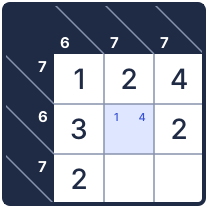
How do I play Kakuro?
Put the digits 1 to 9 in the white cells. Each run of white cells must add up to the clue beside it: the clue above a column, or the clue to the left of a row. A run can't use the same digit twice.
How do I play Calcudoku?
Each row and each column holds each number once. Each outlined cage shows a target and a math sign. The numbers in the cage must reach the target with that sign. A cage of one cell just holds its target.
In the app, tap the question mark next to a puzzle type for the rules and tips.
What is free?
One daily Kakuro, one daily Calcudoku, and unlimited Easy puzzles of both types. There are no ads.
What does Unlock All give me?
Medium, Hard and Expert puzzles of both types, and the archive of past daily puzzles. It's a one-time purchase of $6.99 in the US (the price varies by country). There is no subscription.
How do I restore my purchase?
Open Settings in the app (the gear) and tap Restore purchase. Use the same Apple Account you bought with. Family Sharing members get the unlock too.
How do I get a refund?
Apple handles all purchases and refunds. Ask for a refund at reportaproblem.apple.com.
Is the daily puzzle the same for everyone?
Yes. Every player gets the same Kakuro and Calcudoku on the same date. Solve at least one each day to keep your streak.
How do I stop the red mistake marks?
Open Settings and turn off Show mistakes as I play.
How do pencil marks work?
Tap the pencil button on the number pad to turn on notes. Then tap digits to add or remove small marks in a cell. Tap the pencil again to enter answers.
Do I need the internet?
No. Every puzzle works offline. You need a connection only to buy or restore the unlock.
Will I lose my progress?
Your progress is saved on your iPhone, and an unfinished puzzle is there when you come back. If you delete the app, your progress is deleted too.
What data does the app send?
Anonymous usage data, such as which puzzles are started and finished, with a random ID. No name, email or ad ID. Turn it off in Settings with Share anonymous usage data. See the privacy policy for details.